

































Best AI Tools for Students and Content Creators in 2026: The Ultimate Updated Guide to What’s Trending Right Now
Discover the top trending AI tools for students and content creators in 2026. From ChatGPT Study Mode and Google Gemini’s new student hub to NotebookLM, Claude, Canva Magic Studio, Descript, and more—updated with free student offers, latest features, and real productivity wins.
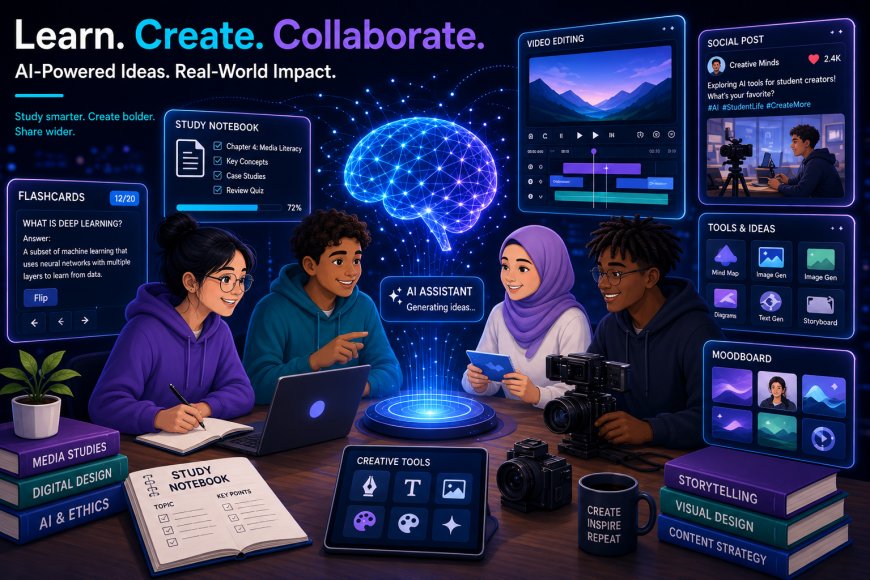
The AI landscape in 2026 has exploded with smarter, more specialized tools that go far beyond basic chat. Students are using AI as true study partners that teach instead of just handing over answers, while content creators are producing higher-quality work in half the time. Google’s massive back-to-school push in August 2026, ChatGPT’s free Study Mode, and powerful free options like NotebookLM have made these tools more accessible than ever.
Here’s a unique, up-to-date roundup of the best AI tools currently trending for both groups—based on real 2026 features, free student offers, and what people are actually searching for and using.
Top AI Tools for Students in 2026
1. ChatGPT (with Free Study Mode)
Still the most versatile all-rounder. Study Mode (now free for all logged-in users) acts like a Socratic tutor—it guides you, asks questions, and helps you understand instead of just giving answers. Great for explanations, brainstorming, coding practice, study plans, and reviewing written work. Pair it with GPT-5.5-level models for strong everyday performance.
2. Google Gemini + New Student Hub
Google’s biggest 2026 education push. A dedicated student hub inside Gemini offers study notebooks, customized flashcards, practice quizzes, interactive visuals (including 3D simulations), and Deep Research. Search now generates custom quizzes for subjects and standardized tests (SAT, ACT, AP, GRE, etc.). Eligible U.S. college students get a free year of Google AI Pro (normally ~$20/month) with higher limits, Gemini Spark, and 5TB storage. Non-U.S. students often get Google AI Plus free for a year. Deep integration with Docs, Drive, Classroom, and Gmail makes it a productivity powerhouse.
3. NotebookLM (Google)
The standout free study tool of 2026. Upload your lecture notes, PDFs, textbooks, or slides and it creates grounded study guides, audio overviews, flashcards, quizzes, and concept maps—only citing your sources. No hallucinations about your material. Completely free with a Google account and ideal for turning messy notes into revision gold.
4. Claude
Excellent for long readings, dense academic texts, and high-quality essay feedback. Strong reasoning, large context windows, and a Learning Mode that pushes you to think. Many universities partner for free or discounted Pro access.
5. Perplexity AI
Best for research that needs real citations. Every answer comes with sources you can verify. Strong student discounts (sometimes a free year of Pro). Perfect for papers, fact-checking, and literature reviews.
Honorable Mentions for Students:
- Quizlet AI — Fast flashcards and exam prep
- Grammarly — Writing polish and clarity
- Khanmigo — Socratic tutoring (especially strong for K-12 and math/science)
- Microsoft Copilot — Great if your school uses Office 365
- Wolfram Alpha — Reliable computational engine for STEM
Top AI Tools for Content Creators in 2026
1. ChatGPT & Claude
The dual foundation for most creators. ChatGPT for rapid ideation, scripting, captions, and repurposing. Claude for long-form writing, nuanced tone matching, and careful editing. Both handle brainstorming, outlines, and first drafts exceptionally well.
2. Canva Magic Studio
The everyday design workhorse. AI-powered graphics, social posts, presentations, thumbnails, and brand kits. Fast, accessible, and heavily used for consistent visual content.
3. Descript + Opus Clip / CapCut
Descript lets you edit video and podcasts by editing the transcript (remove filler words, rearrange sections). Opus Clip (or similar) auto-detects viral moments and turns long videos into Shorts/Reels. CapCut remains a free/powerful mobile-first option for short-form.
4. Midjourney / Adobe Firefly / Google Imagen
High-quality image generation for thumbnails, hero images, illustrations, and social visuals. Midjourney still leads for aesthetic polish; Firefly and Imagen offer strong commercial-safety and integration options.
5. ElevenLabs
Industry-standard AI voiceovers, narration, and voice cloning. Natural-sounding and widely used for YouTube, podcasts, and social videos.
Other Strong Creator Tools:
- Jasper — Brand-consistent marketing content at scale
- Runway — Advanced AI video generation and editing
- Perplexity — Research and trend spotting with sources
- Buffer or similar — AI-assisted scheduling and social post generation
Quick Tips for Getting the Most Out of These Tools in 2026
- Start free: NotebookLM, ChatGPT Study Mode, Gemini free tier, Canva free, CapCut, and Quizlet cover a huge amount of value.
- Claim student offers immediately (Google AI Pro free year for eligible U.S. students is a major win right now).
- Use specialized tools for specialized jobs—NotebookLM for your notes, Perplexity for citations, Claude for long writing, Canva + Midjourney for visuals.
- Always fact-check, edit, and add your own voice. AI is a powerful collaborator, not a replacement for critical thinking or creativity.
- Combine tools: Research in Perplexity → outline and draft in Claude/ChatGPT → polish in Grammarly → visuals in Canva → video in Descript.
The biggest shift in 2026 is that AI tools have become more educational and more workflow-integrated. Students who use Study Mode, NotebookLM, and Gemini’s grounded features learn better. Creators who build a tight stack (writing + design + video + voice) ship more consistently without burnout.
Which of these tools are you already using, or which one are you most excited to try this semester or content cycle? Drop your favorites or questions below—let’s keep the conversation going!
What's Your Reaction?
 Like
0
Like
0
 Dislike
0
Dislike
0
 Love
0
Love
0
 Funny
0
Funny
0
 Angry
0
Angry
0
 Sad
0
Sad
0
 Wow
0
Wow
0